![Logo-RGB.png]](https://help.repmove.app/hs-fs/hubfs/Logo-RGB.png?height=40&name=Logo-RGB.png)
Merge is available in the web portal only.
Merge eligibility rules
-
Parent accounts (Customers and Prospects) can be merged with other parent accounts.
-
Child accounts (Site/Satellite accounts) can be merged with other child accounts.
-
You cannot merge a Site/Satellite account into a Prospect or Customer account (the Merge option will be unavailable/grayed out).
- You can merge up to five (5) accounts into a single primary account.
Before you merge (recommended)
-
Make primary selection easy: Merge selection is driven by account name. If multiple duplicates have the exact same name, consider updating the name on the primary account or adding a distinguishing detail to the duplicate names before merging.
-
Validate key fields: Compare items like address and recent activity to identify which record is most accurate.
How to merge accounts (step-by-step)
-
In the web portal, open Accounts from the left navigation menu.
-
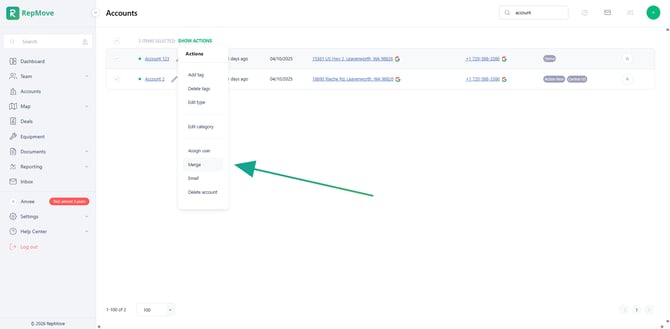
Select the duplicate accounts you want to merge, then choose Show actions->Merge.
-
Select the primary account name.
-
After you select the primary, the merge form will auto-fill with information from that account.
-
Review each section and pick the values you want to keep from any of the selected accounts (for example: Category, Tags, Account Type, Users Assigned, and other available fields).
-
For Tags, all tags from the selected accounts will be combined. Remove any tags you do not want to keep.
-
Confirm the Last Visited date is the most recent.
-
Select Save.
-
Review the confirmation message and select Merge the accounts to complete the merge.
What gets merged
When you confirm the merge, the platform combines key related records into the primary account and deletes the duplicate accounts. This action cannot be undone.
The merge confirmation indicates the following items are merged into the primary account:
-
Notes
-
Contacts
-
Tasks
-
Deals
-
Documents
-
Equipment (if your organization uses it)